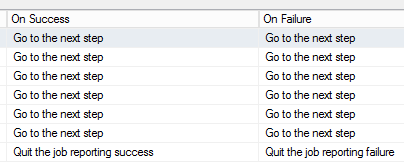

Imagine that you want multiple steps in one MSSQL agent job. Every step has to be executed (no matter what) and you will want to be informed if one of the steps failed.
First you need the guid of the job you are running.
SELECT TOP(1)
 job_id
FROM
 msdb.dbo.sysjobhistory jh
WHERE
 step_name = '<pick a step name from your job'
After this you can put a last step in you job with the following code:
Don’t forget to change the text <PUT YOUR JOB GUID HERE!> to the GUID you got from the last step.
SET QUOTED_IDENTIFIER ON;
DECLARE @errorMsg nvarchar(max);

SELECT
 @errorMsg= 'The following steps failed, please investigate:' + LEFT(o.list, LEN(o.list)-1)
FROM (
 SELECT
 *
 FROM
 msdb.dbo.sysjobhistory jh
 join msdb.dbo.sysjobactivity ja ON jh.job_id=ja.job_id
 WHERE
 run_status=0 --step failed
 AND step_id != 0
 AND jh.job_id = CONVERT(uniqueidentifier, '<PUT YOUR JOB GUID HERE!>')
 AND convert(varchar(10),jh.run_date,112) = convert(varchar(10),getdate(),112)
 order by instance_id -- this sort off ensures that we just pull information from the most recent job run
 FOR XML PATH ('')

) o (list)

IF @errorMsg is null
 print ' Everything looks good...'
ELSE
BEGIN
 RAISERROR (@errorMsg, 16, 1)
END
Don’t forget to change the job steps so that all steps are going to the last step and the last step reports a success or a failure. Of course you also have to setup notification in the SQL Server Agent.